
Case Study Tab
The Case Study tab is the research ledger for Algo Lab. It binds a hypothesis to a Pine strategy tab, then keeps versions, trials, linked reports, Algo Agent evidence, and promotion decisions together.
Use this page as a reference for what each Case Study area stores and when to use it.
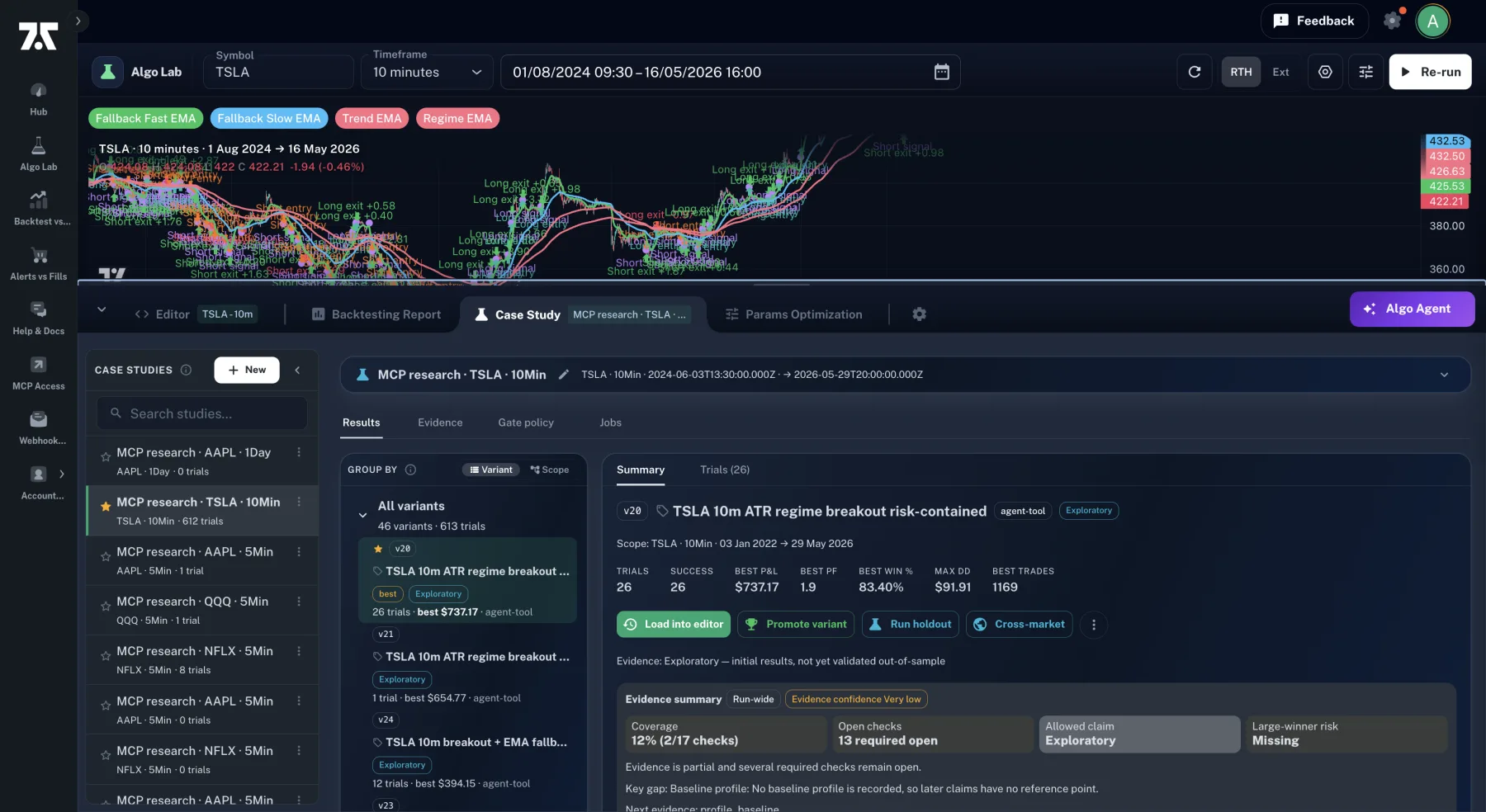
Select a study on the left, a version or scope in the tree, and then inspect its summary, trials, and evidence before taking a candidate action.
Core Concepts
Section titled “Core Concepts”| Concept | Meaning |
|---|---|
| Case Study | A named research investigation with a hypothesis, scope, linked Pine file, versions, trials, reports, evidence, and jobs. |
| Linked Pine tab | The editor tab the study is investigating. Loading a candidate into the linked tab keeps the research attached to the same file. |
| Version | A saved Pine source snapshot. Versions can come from manual saves, parameter work, or Algo Agent candidates. |
| Trial | A run result attached to a version and scope. Trials can be baseline runs, parameter rows, validation-slice checks, cross-market tests, or Algo Agent evaluations. |
| Evidence | The readiness state behind a candidate: baseline comparison, validation-slice result, trade count, stability, linked reports, and gate-policy status. |
| Promotion | A research marker for the best candidate. Promotion does not overwrite the editor tab and does not deploy or execute code. |
When to Create One
Section titled “When to Create One”Create or select a Case Study before serious optimization. Scratch runs are fine while checking syntax or data access, but use a Case Study when any of these are true:
- You are comparing more than one version of the same strategy.
- You want the Algo Agent to run a bounded research loop.
- You want to save parameter sweep results.
- You need a record of why one candidate was promoted over another.
- You are linking Backtest vs Alerts or Alerts vs Fills reports to the research.
Panel Structure
Section titled “Panel Structure”The Case Study tab has a header, a left study list, and a detail panel.
| Area | Purpose |
|---|---|
| Header | Shows the title, symbol, timeframe, date range, hypothesis, and rename controls. |
| Study list | Selects, creates, renames, archives, or deletes studies. The list helps you switch between investigations without losing the editor context. |
| Results | Shows the version/trial tree and detail tabs for Summary and Trials. |
| Evidence | Shows Algo Agent evidence maturity for the run or selected variant. |
| Gate policy | Edits research gates once the study has recorded Algo Agent evidence. |
| Jobs | Lists server-side research jobs associated with the Case Study. |
Results View
Section titled “Results View”The Results view is the main research table. It can group records two ways:
| Grouping | Use when |
|---|---|
| By variant | You want to inspect each source version and see its related trials. |
| By scope | You want to compare how versions behaved across symbol/timeframe/date-range scopes. |
Selecting a tree node changes the detail area:
- Summary shows the selected version, best available trial, evidence state, linked reports, source actions, and promotion status.
- Trials shows all runs associated with the selected version or scope, including origin, kind, status, metrics, settings, inputs, duration, warnings, and error details.
Version Actions
Section titled “Version Actions”The Case Study page separates source review from source replacement.
| Action | Result |
|---|---|
| View code | Opens the stored source for inspection without changing the editor. |
| Stage in editor | Creates a reviewable diff in the editor. Accepting or rejecting follows the same staged-candidate path used by the Algo Agent. |
| Load into tab name | Replaces the named, linked Pine tab with that version’s source after any required confirmation. Use this when the candidate belongs to the same investigation. |
| Load into editor | Creates a new editor tab when the study is not linked to an open tab. |
| Run on chart | Runs the selected version against the current chart scope without first making it the permanent editor source. |
| Delete version | Removes a saved source snapshot after confirmation. This can affect related trial visibility. |
Trial Types
Section titled “Trial Types”Trials are run records. Common origins include:
| Trial source | What it records |
|---|---|
| Manual run | A direct backtest from the current editor tab and chart scope. |
| Parameter sweep | One row from Params Optimization, including the input values used for that row when available. |
| Algo Agent evaluation | A candidate evaluation created by the Algo Agent’s tool loop. |
| Validation slice | A check against the protocol’s later slice. |
| Cross-market test | A test of the selected version against another symbol or market scope. |
Use the Trials tab to confirm whether a candidate only won once, won across several scopes, or failed under a more realistic validation path.
Linked Reports
Section titled “Linked Reports”Linked reports connect the Case Study to evidence produced outside the Lab:
- Backtest vs Alerts reports help explain whether TradingView alerts match the strategy logic.
- Alerts vs Fills reports help explain fill quality, slippage, and live behavior after alerts fire.
Link reports when the research claim depends on alert or fill evidence. Unlink reports when they no longer describe the active hypothesis or version family.
Gate Policy and Evidence
Section titled “Gate Policy and Evidence”Gate policy defines what counts as acceptable research evidence for Agent-driven work. A gate can be informational, mandatory, or blocking depending on the policy stored on the Case Study.
Typical gates include:
- Baseline comparison
- Holdout pass
- Minimum trade count
- Edge margin over baseline
- Stability across relevant scopes
- Linked operational evidence when live/fill behavior matters
The Evidence tab shows maturity. The Gate policy tab lets you update the policy after Algo Agent evidence exists. Existing studies keep their own policy; the Configuration tab only controls defaults for new Case Studies.
Recommended Workflow
Section titled “Recommended Workflow”-
Create or select a Case Study before optimization.
-
Write the hypothesis in plain language. Example: “Improve the AAPL 10-minute RSI baseline without increasing drawdown or reducing trade count below the minimum gate.”
-
Run a baseline from the Editor tab, then add the result to the Case Study.
-
Save meaningful versions before running parameter sweeps or asking the Algo Agent for structural changes.
-
Record trials from manual runs, parameter sweeps, validation-slice checks, and Algo Agent evaluations.
-
Link reports when alert behavior or fill behavior is part of the decision.
-
Promote one candidate only when its evidence is stronger than the baseline and its risks are understood.
Operational Rules
Section titled “Operational Rules”- Promotion is a research decision, not a deployment.
- The editor tab is only changed when you load, stage, or accept source.
- The Algo Agent uses the active Case Study state; select the right study before starting a run.
- Keep one hypothesis per Case Study. Start a new study when the objective or strategy family changes materially.
- Use the linked tab for same-file candidates. Use a new tab for deliberate branches.
- If a result is not reproducible under the same scope and settings, do not treat it as promoted evidence.
Troubleshooting
Section titled “Troubleshooting”| Symptom | What to check |
|---|---|
| A trial is not attached to the expected study | Confirm the correct Case Study was active before the run. |
A version does not show the in editor chip | The active editor source hash does not match that saved version. |
| Algo Agent evidence is missing | The Algo Agent may not have committed evidence yet, or the run may have stopped before a ledger-changing tool call. |
| Gate policy is not editable | Gate policy appears after the study has recorded Algo Agent evidence. |
| A linked report looks stale | Open the report in its native page and confirm it matches the same symbol, timeframe, date range, and version family. |
| Candidate source would replace local edits | Use staged diff review or open a new editable tab instead of loading directly into the linked tab. |