
Algo Agent
The Algo Agent is an AI assistant embedded in the Algo Lab. In Agent mode it does not run a single turn and stop — it runs an autonomous multi-step research loop: planning, running backtests, proposing strategy variants, evaluating them on holdout data, and committing verified candidates back into your Case Study.
The Algo Agent works in Pine Script v6 only. The active strategy must declare
//@version=6; migrate a v5 or older strategy to v6 before you start a run.
This page covers what that means in practice and where you stay in control.
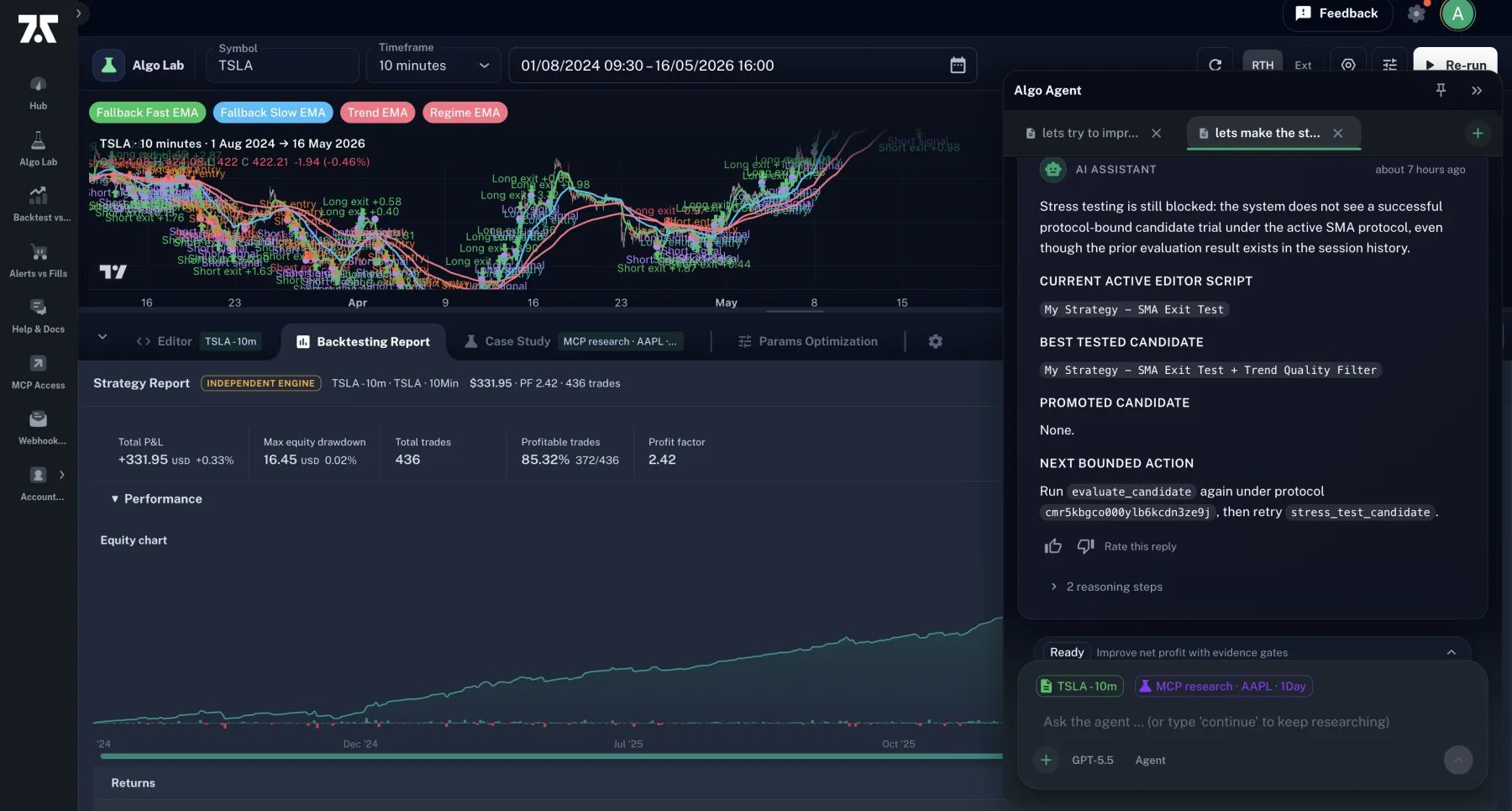
The drawer stays beside the active Lab workspace, so the conversation and its evidence remain visible while you inspect the chart or report.
How to start an Algo Agent run
Section titled “How to start an Algo Agent run”There is no separate “Run loop” button. The autonomy is the mode.
-
Open the Algo Agent rail on the right side of Algo Lab.
-
Make sure the mode selector shows “Agent” (below the chat input). Other modes — Ask (conversational) and Research (focused one-shot) — do not start the autonomous loop.
-
Type your research goal and press Send. Examples:
- “Take this AAPL strategy and test one bounded RSI-filter hypothesis against the current baseline.”
- “Evaluate whether a stricter RSI threshold improves the locked objective without violating the drawdown and trade-count gates.”
- “Test three different stop-loss approaches on the active strategy and pick the best one.”
-
The agent runs autonomously. You’ll see “Thinking” / “Working” indicators, tool calls (analyse losing trades, propose candidate, evaluate, verify, commit), and a running step counter.
-
The loop stops on its own when any of these is true:
- The agent commits a verified candidate
- A turn produces no new research evidence
- The Case Study ledger stops advancing (no new evidence is being recorded)
- The bounded step or runtime budget is exhausted
- The mission reaches a terminal state (e.g. ask-user required)
- You hit Stop
Continuing a run
Section titled “Continuing a run”When the loop stops on a non-terminal condition (most commonly “no new evidence this turn”), the composer hints: “(or type ‘continue’ to keep researching)”.
Recognised continuation verbs:
continuekeep goingnextnext stepnext iterationproceedgo onmorekeep researchingcontinue the loopcontinue research
Type any of these as a chat message in Agent mode and the agent picks up where it left off, using the existing Case Study state.
Chat verbs for staged candidates
Section titled “Chat verbs for staged candidates”When the agent commits a verified candidate, it stages the candidate’s source into your editor as a diff view. You’ll see an alert banner at the top of the page and a side-by-side diff in the editor tab.
You can accept or reject the staged candidate three ways:
- Click Accept or Reject in the banner
- Click ✓ Accept All or ✗ Reject All in the diff editor’s toolbar
- Type a verb in the chat:
| Accept verbs | Reject verbs |
|---|---|
accept | reject |
apply | discard |
ship it | cancel |
land it | drop it |
commit it | undo |
use it | never mind |
yes | no |
All three paths run the same five-step accept protocol (claim → re-check → capture → write → finalize). Read more in Engine vs TradingView about why you should still review the candidate’s source before saving it.
What “verifier-pass” means (and doesn’t)
Section titled “What “verifier-pass” means (and doesn’t)”The agent labels a candidate verifier-pass when it satisfies our statistical gates:
- Beat the baseline on the locked objective metric (e.g.
netProfit) - Beat the baseline on both the training slice and the validation slice of historical bars
- Pass minimum trade-count, stability, and edge-margin checks
- Holdout block present with
holdoutPassed: true
This means the candidate met the configured historical evidence gates for that run. It does not mean:
- The strategy will be profitable on live capital
- The strategy will reproduce on TradingView’s engine (more here)
- The strategy is robust to regime change after the historical sample
- You can skip independent forward validation
Treat verifier-pass as “worth your serious review”, not as a buy signal.
What it costs
Section titled “What it costs”The Algo Agent consumes hosted AI credits while it runs. Usage depends on:
- Prompt size — your strategy’s source code, the Case Study state, prior turn history, all flow into the prompt each turn
- Tool output size —
evaluate_strategy_candidateandverify_strategy_candidatereturn substantial JSON; those bytes count - How long the loop runs before stopping
- Analysis depth — Deep Analysis broadens expert-review criteria without raising the turn cap
Algo Agent charging follows the provider cost of each model request. Cached input is discounted, cache writes and output use their provider-cost ratios, and model-specific or long-context rates are included. Large conversations use server-side compaction to reduce repeated context after the active window grows past its configured threshold. This makes long runs more affordable without discarding the Case Study evidence stored by the platform.
The app shows the available credit balance. Each turn reserves a bounded amount from that balance and stops when its step/runtime budget or available credits are exhausted. The final charge cannot exceed the turn’s reservation. Because source length, evidence context, tool output, and provider rates vary, the documentation does not promise a fixed cost per research loop.
New accounts receive 50 starter credits. Basic includes 400 monthly credits, Professional includes 1,000, and paid subscribers can buy top-ups of 250 for $10, 500 for $20, or 1,000 for $40. Monthly credits reset with the billing period; purchased credits roll over.
If your AI credit balance is exhausted mid-run, the loop halts with a clear blocked-state message and you can top up before continuing.
Stop conditions in detail
Section titled “Stop conditions in detail”A turn is considered to have produced evidence if at least one of these happened:
- A backtest result was returned (
run_backtest,evaluate_strategy_candidate,verify_strategy_candidate) - A strategy candidate was committed (
commit_candidate) - A research lesson was saved (
save_research_lesson) - The Case Study mission state advanced (a research-plan step completed, mission baseline was set, etc.)
The Case Study ledger advances when any of those produces a durable record (a new CaseStudyVersion, a new mission-state row, etc.).
If both checks fail — a turn produced only inspection-only tool calls and no ledger change — the loop stops to avoid spending credits on no-op iterations. This is a feature, not a bug; if you want the agent to keep going, type continue and it will plan a different approach on the next turn.
Limits on what the agent will do on its own
Section titled “Limits on what the agent will do on its own”The agent will:
- Run backtests, evaluations, verifications, and analyses
- Propose strategy variants and commit them as
CaseStudyVersionrows - Stage verified candidates into your editor for your review
- Save research lessons documenting dead-ends
- Update the Case Study mission state
The agent will not, without your explicit action:
- Save a candidate as the active editor tab’s permanent code (you accept the staged candidate)
- Send orders to your broker (the lab does not execute live orders)
- Modify your TradingView account
- Charge more than the bounded credit amount reserved for the turn
- Continue past its stop conditions
- Use a different Case Study than the one you’ve selected
Related
Section titled “Related”Follow the complete research flow
Section titled “Follow the complete research flow”See Strategy research workflow for the sequence from hypothesis and protocol to experiments, evidence gates and human review.